OSSTagLab: Decoding the Sound of Golf Club Tags
My curiosity around club tags started when someone borrowing my putter said, “Your putter is making weird noises.” I couldn’t hear a thing. It turns out the sound coming out of my putter was near ultrasonic.
My putter had an Arccos Gen 4 club tag screwed onto the end of the grip. I had been using club tags for around six months and I loved them. I recorded my lowest round with them and my longest drive. I learned about my miss tendencies and club distances on the course.
Overall, the software experience was smooth. However, when I wanted to play one of my favorite short par 3 courses, the 4 hole Joe Balander course in Austin, Texas, I ran into one of its shortcomings. The app reported 6 holes instead of the actual 4.
I emailed Arccos support and they told me the software simply didn’t support 4 hole courses. They only supported 6, 9, 12, and 18 hole courses. This limitation seemed like a hard coded, arbitrary rule. Now I had motivation to go along with my curiosity. And so began the journey of OSSTagLab.
A shot tracking tag has one job: tell a phone which club left the bag and when it struck the ball. It does that with sound, in short tones between 17 and 20 kHz, just above what most adults hear and well inside what a laptop microphone records.
A set of Arccos Gen 4 tags, a MacBook microphone and a flashlight were enough to work out what the tags are sending. OSSTagLab is the open source web app that came out of it, built to open club tagging to anybody.
Listening at 18 kHz
A browser records the microphone at 48 kHz, which captures everything up to 24 kHz, the Nyquist frequency. A spectrogram makes the result visible: time runs across, frequency runs up, brightness shows loudness. Under the hood it is a short-time Fourier transform: short slices of the recording, each shaped by a Hann window and passed through a fast Fourier transform.
The decoder takes a 10 ms slice every millisecond and keeps the strongest frequency between 16.5 and 21 kHz. What is left is a single line of frequency over time. A tag sends its data as steps up and down in that line, which is a form of frequency-shift keying.

Three Signals
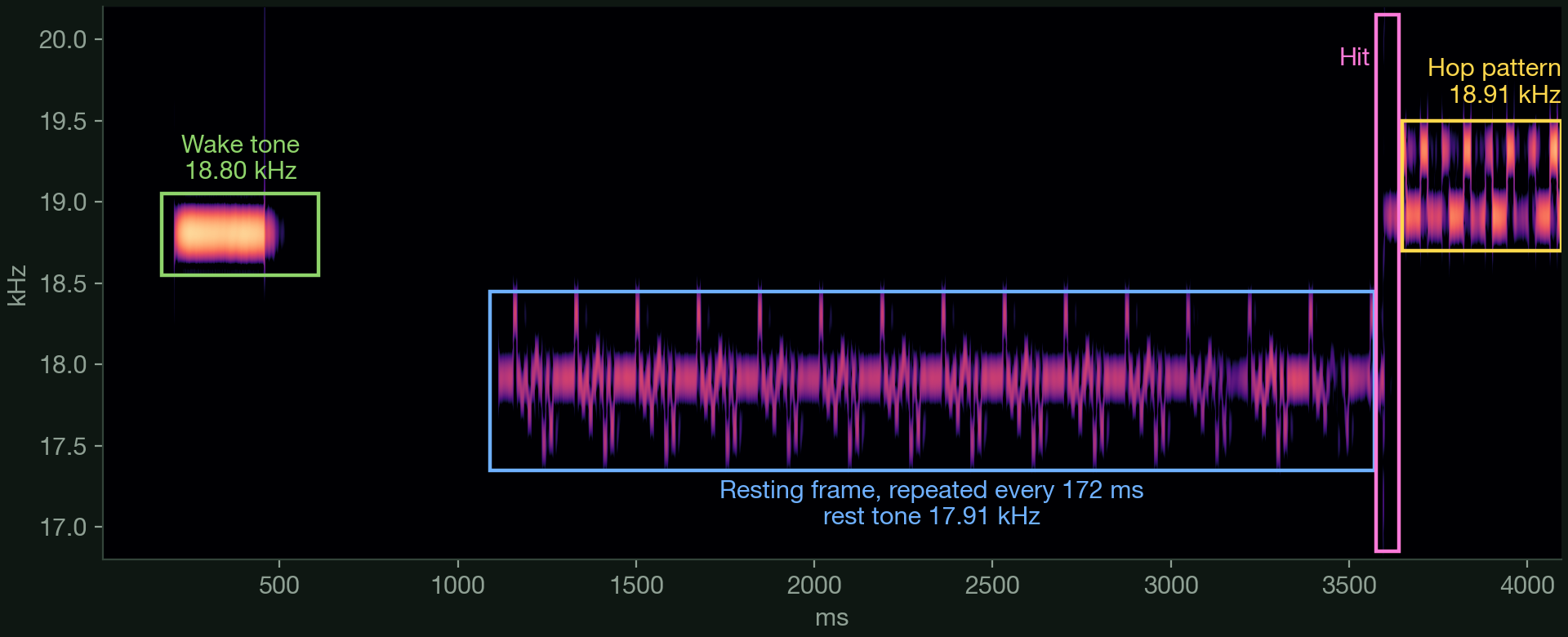
A tag sends one tone at a time and rests near 18 kHz. Light wakes it up and a hit changes what it sends. That makes three signals to learn: a wake tone, a resting frame and an after hit signal.
The Wake Tone
A tag wakes when light reaches it, as it does when a club leaves the bag. When it wakes up, it plays one steady tone for about 0.4 seconds, about 0.9 kHz above its rest tone. From driver to wedge, the clubs land between 18.68 and 18.92 kHz.
The Resting Frame
Half a second later the tag settles onto its rest tone, between 17.78 and 18.02 kHz on this set. Every 172 ms it sends a frame of six symbols, each a 10 ms tone 1 to 4 steps of 100 Hz above or below the rest tone.
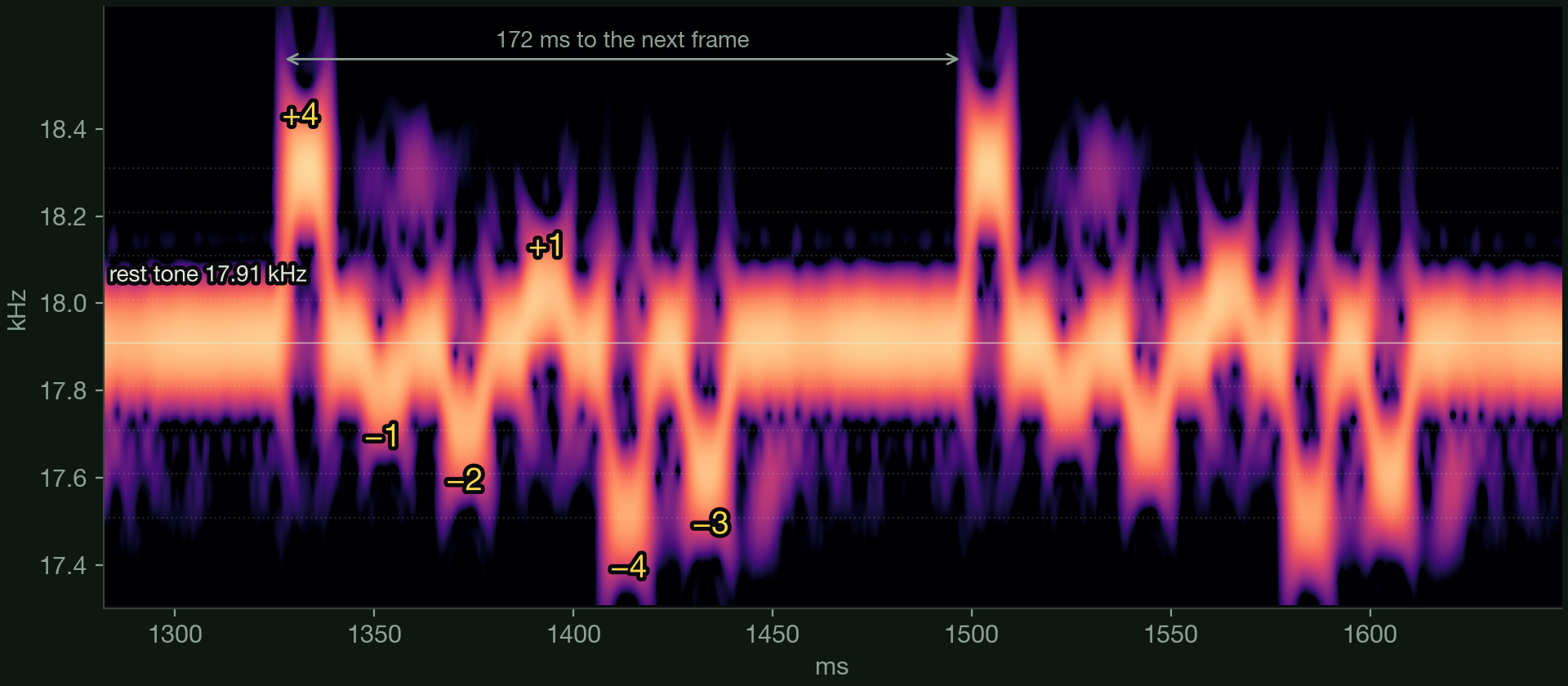
This 9 iron reads +4 −1 −2 +1 −4 −3. Each club has its own frame, so you only need to hear one frame to know which club it is.
The After Hit Signal
The tag reacts to a hit within about 12 ms. The rest tone moves up 1 kHz and the tag begins to hop: up for about 21 ms, back down, and again at a fixed interval for several seconds, until the resting frame returns.

The size and pace of the hop change from club to club: 200, 300, 400 or 500 Hz, every 60, 80, 100 or 120 ms.
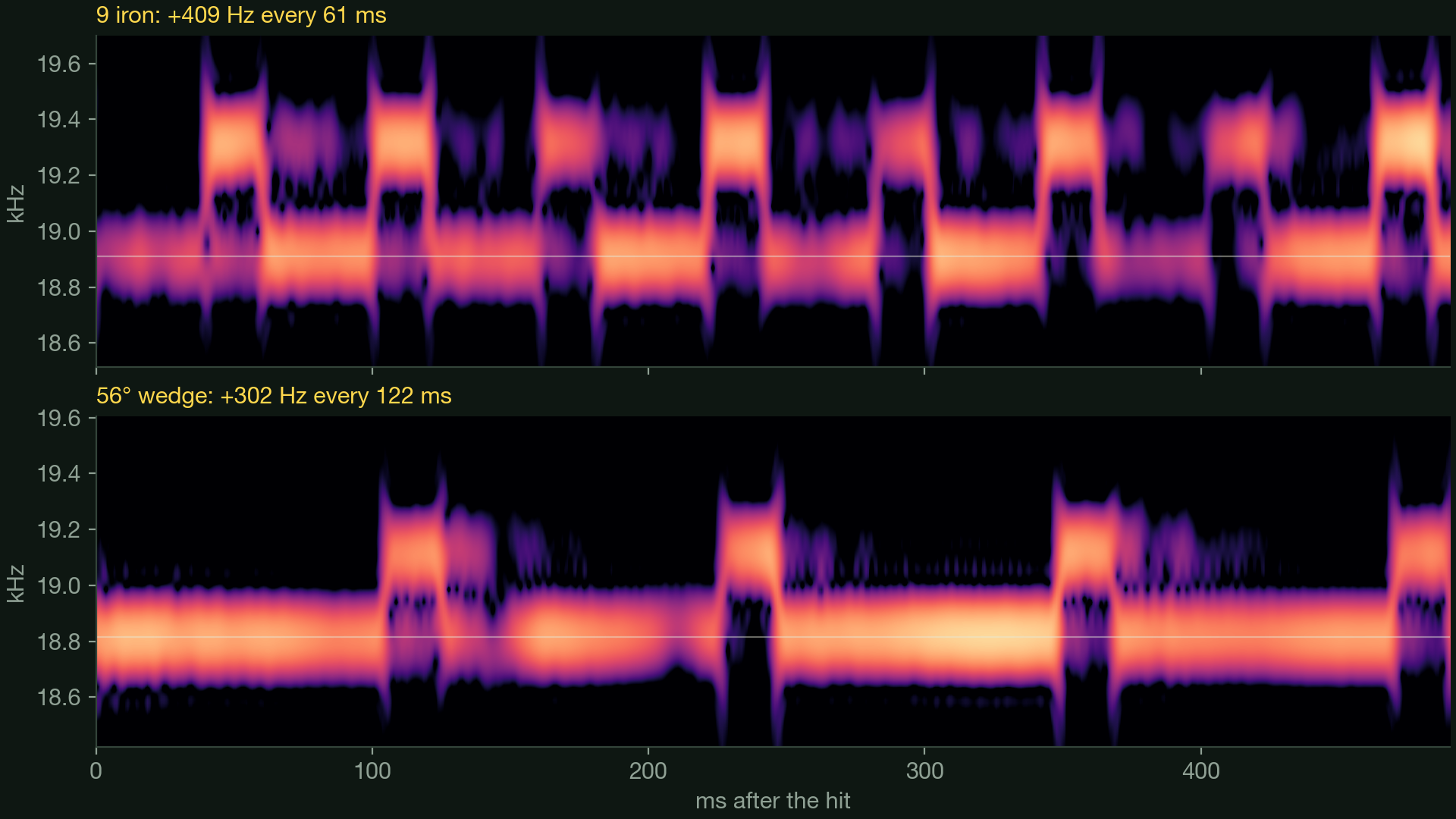
The hop pattern tells you the club was hit. The resting frame right before it tells you which club it was.
The Putter is Different
The putter is different from the moment it wakes up. Its wake tone is at 19.81 kHz, about 1 kHz above every other club in the bag.
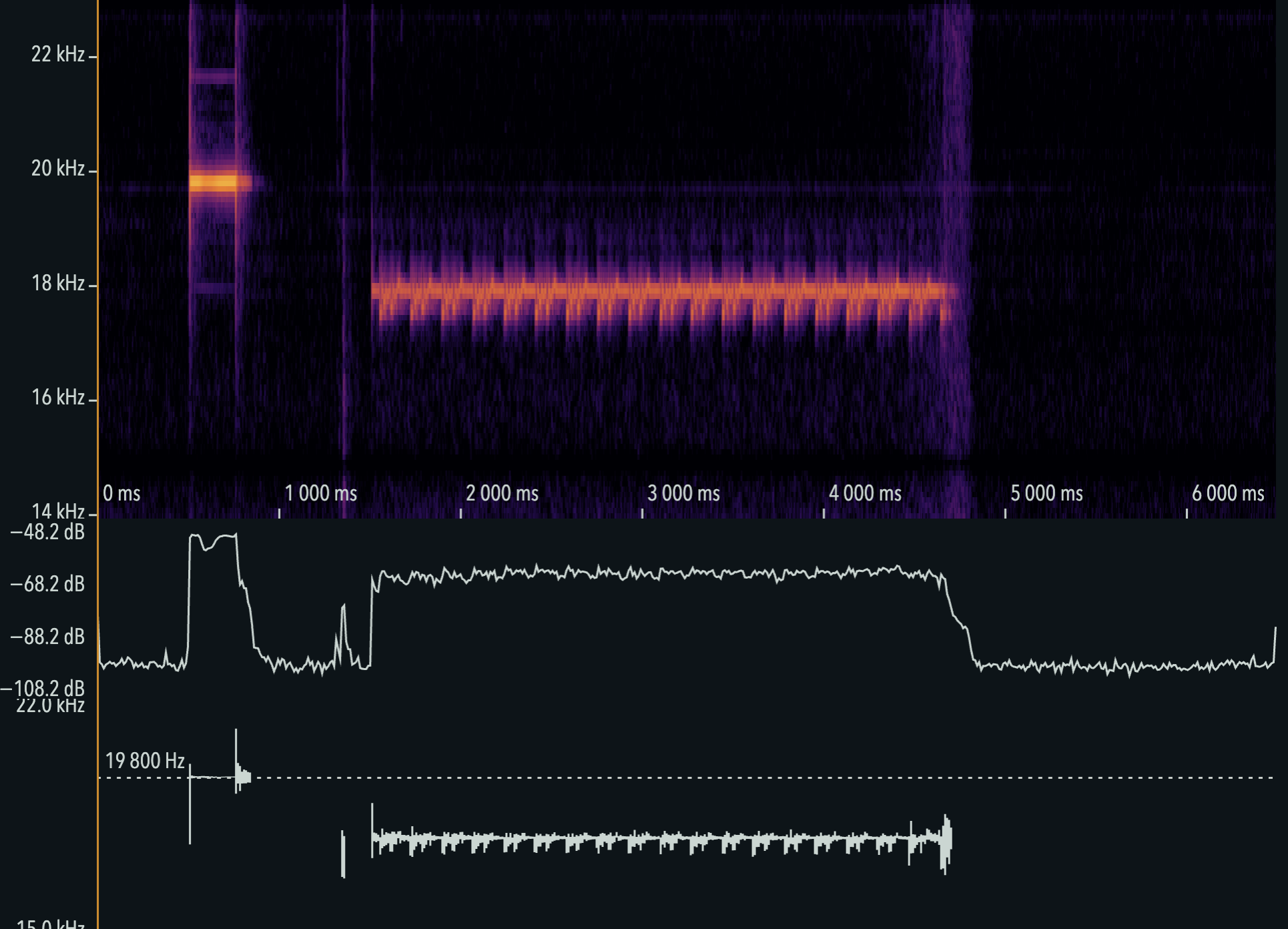
It also reacts to a hit differently. It stays on its rest tone and switches to a second frame for about two seconds. At rest it sends −4 −2 −1 −3 −1 +1, and after a hit it sends +1 +3 +4 +2 +4 −1.
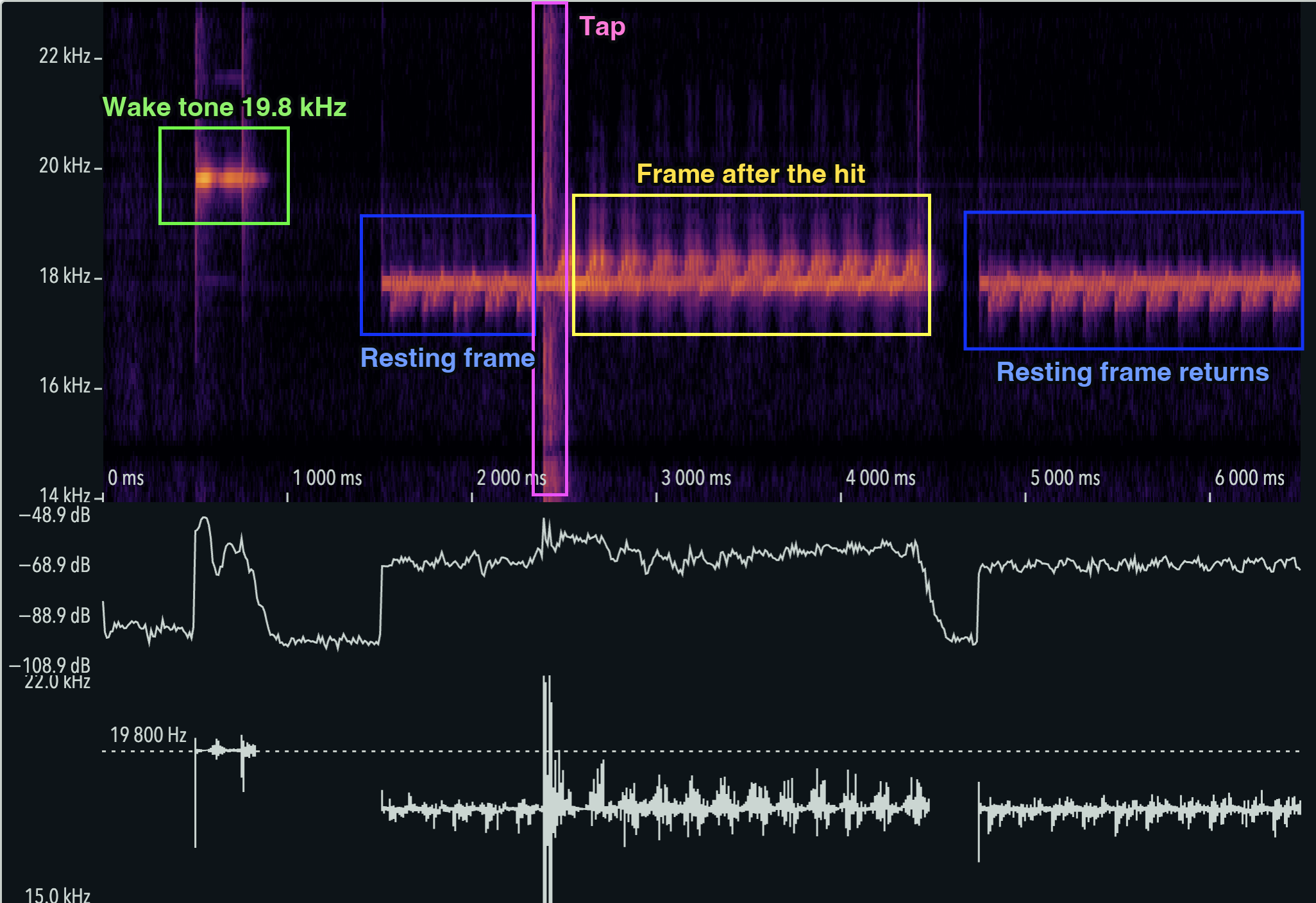
The vertical line is the tap, a short click across every frequency. The decoder listens for it between 2 and 8 kHz to work out when the hit happened.
OSSTagLab
OSSTagLab puts all of this on one page. It runs on your own computer, listens through the browser, maps each club, names the club in hand and counts hits.
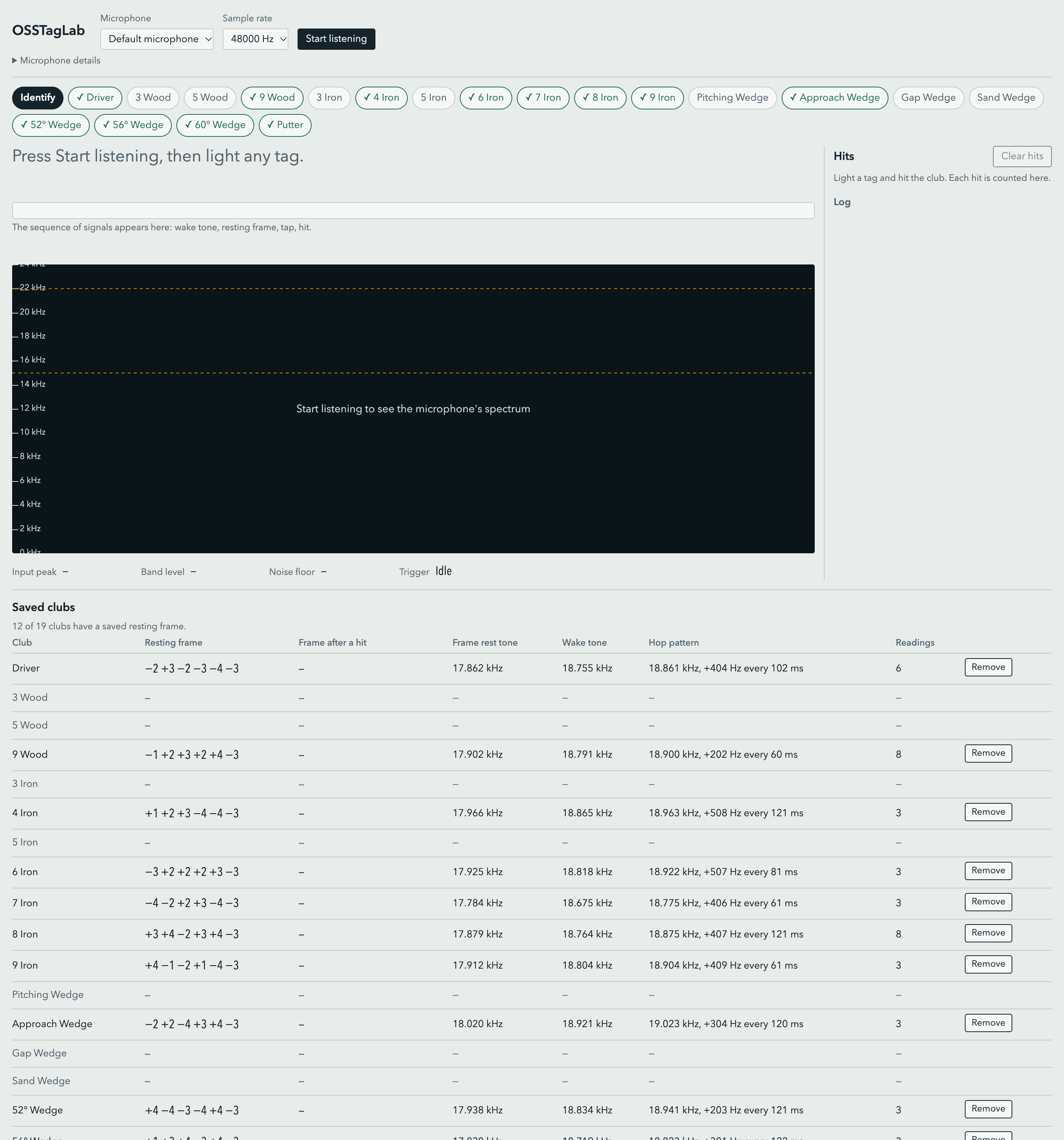
It needs Python 3.9 or newer and a browser.
git clone https://github.com/OSSGolf/osstaglab
cd osstaglab
python3 server.py
Open http://127.0.0.1:8765 and press Start listening. I recommend shining a flashlight at the club tags, since indoor light can be too dim to wake them.
The project is independent, built by listening to one set of tags. The decoder, its tests and short recordings are in the repo, so you can port it to a phone or a microcontroller.
The data from my club tags is in the repo, but yours will most likely be different. A frame holds six symbols with 8 possible values each, so there can be up to 262,144 unique club tag sounds.